

テーマ「Simplicity」には人気記事を表示するウィジェットが準備されています。
ですがそれは「Wordpress Popular Posts」プラグインが必須とのこと。
プラグインを使用せずに表示することはできないか、と思い参考にさせて頂いたのがこちらの記事。

http://munouya.com/website/my-popular-posts.html
munouya.com
こちらのサイトはお手本にしたいほどスッキリキレイなデザインでした。
まずは functions.php の編集。
// アクセス数の取得
function get_post_views($postID){
	$count_key = "post_views_count";
	$count = get_post_meta($postID, $count_key, true);
	if($count == ""){
		delete_post_meta($postID, $count_key);
		add_post_meta($postID, $count_key, "0");

		return "0";
	}

	return $count;
}

// アクセス数の保存
function set_post_views($postID){
	$count_key = "post_views_count";
	$count = get_post_meta($postID, $count_key, true);
	if($count == ""){
		$count = 1;
		delete_post_meta($postID, $count_key);
		add_post_meta($postID, $count_key, "1");
	}else{
		$count++;
		update_post_meta($postID, $count_key, $count);
		//delete_post_meta($postID, $count_key);// カウントをリセットする時に使用
	}
}
最後の delete_post_meta は、このカスタマイズの途中で私自身がいろんなページを確認しててpvが偏ってしまったので、一度リセットする時に使いました。(もっとスマートなやり方もありそうですが ^^; )
そして sidebar.php の編集。
<div class="widget my-popular-posts">
	<h3>人気の記事</h3>
	<?php
	if( is_single() || is_page() ){
		// 記事ページまたは固定ページの場合、アクセス数の保存
		set_post_views( get_the_ID() );
	}

	$args = array(
		"post_type"		=> array( "post", "page" ),
		"numberposts"		=> 10,// 表示件数
		"meta_key"		=> "post_views_count",
		"orderby"		=> "meta_value_num",
		"order"			=> "DESC",
	);
	$posts = get_posts( $args );
	if( $posts ) : ?>
	<ol>
		<?php foreach( $posts as $post ) : setup_postdata( $post ); ?>
		<li>
			<?php /*<div class="thumb"><a href="<?php the_permalink(); ?>"><?php the_post_thumbnail( "medium" ); ?></a></div>*/ ?>
			<p class="title">
				<a href="<?php the_permalink(); ?>"><?php the_title(); ?></a>
				<span>(<?php print get_post_views( get_the_ID() ); ?> pv)</span>
			</p>
		</li>
		<?php endforeach; ?>
		<?php wp_reset_postdata(); ?>
	</ol>
	<?php else : ?>
	<p class="empty">只今集計中です。</p>
	<?php endif; ?>
</div>
記事ページに加えて固定ページも集計したかったので、4行目に 「|| is_page()」を追加し、10行目の”post_type”を「array( “post”, “page” )」に変更しました。
それから、数字付きのランキング形式にしたかったため、ul ではなく ol にしました。
丸数字のcssについては下記の記事を参考にしました。

[CSS]順序付きリスト、ol要素を丸数字で実装するスタイルシートのテクニック -spanや①は無し
Webで調べると、ol要素を丸数字で実装する時はspanとか①②③とかを使うしかないように思えますが、クリーンなHTMLで数値文字参照を使わずに、丸数字を実装するスタイルシートのテクニックを紹介します
coliss.com
更に、ちょこっと手書き風の丸にしようと思い、こちらを参考に。

404 File Not Found
www.m-k-works.com
最終的なcssはこちら。
#sidebar .widget.my-popular-posts ol {
  counter-reset: my-counter;
  list-style: none;
  padding: 0;
}
#sidebar .widget.my-popular-posts ol li {
  margin-bottom: 10px;
  padding-left: 30px;
  position: relative;
}
#sidebar .widget.my-popular-posts ol li:before {
  content: counter(my-counter);
  counter-increment: my-counter;
  color: #333;
  display: block;
  float: left;
  line-height: 22px;
  margin-left: -30px;
  text-align: center;
  height: 22px;
  width: 22px;
  border-radius: 100% 80% / 80% 85% 80% 90%;
  border: 1px solid #333;
  font-size: 90%;
  letter-spacing: -2px;
  text-indent: -2px;
}
#sidebar .widget.my-popular-posts ol li:nth-child(2n):before {
  border-radius: 100% 85% / 80% 100% 70% 100%;
}
#sidebar .widget.my-popular-posts ol li:nth-child(3n):before {
  border-radius: 80% 90% / 80% 80% 90% 80%;
}
#sidebar .widget.my-popular-posts ol li span {
  font-size: 80%;
}
border-radius で歪んだ丸を作る場合のこういった記述を初めて見ました。
どういう仕組みになってるのかよくわからなかったのですが、いつもお世話になっているサイトの下記記事に詳しく書かれていました。

今さら聞けない!? CSSのborder-radiusで様々な角丸に挑戦!
要素の四隅の角を丸めるためのCSSプロパティー「border-radius」。ボックスや画像などの要素に対して適応でき、角丸にしたりまん丸にしたりと、様々な表現が可能です。このプロパティーが使えるようになってから、どれだけコーディングが楽に...
www.webcreatorbox.com
勉強になります!
最終的な表示がこちら。
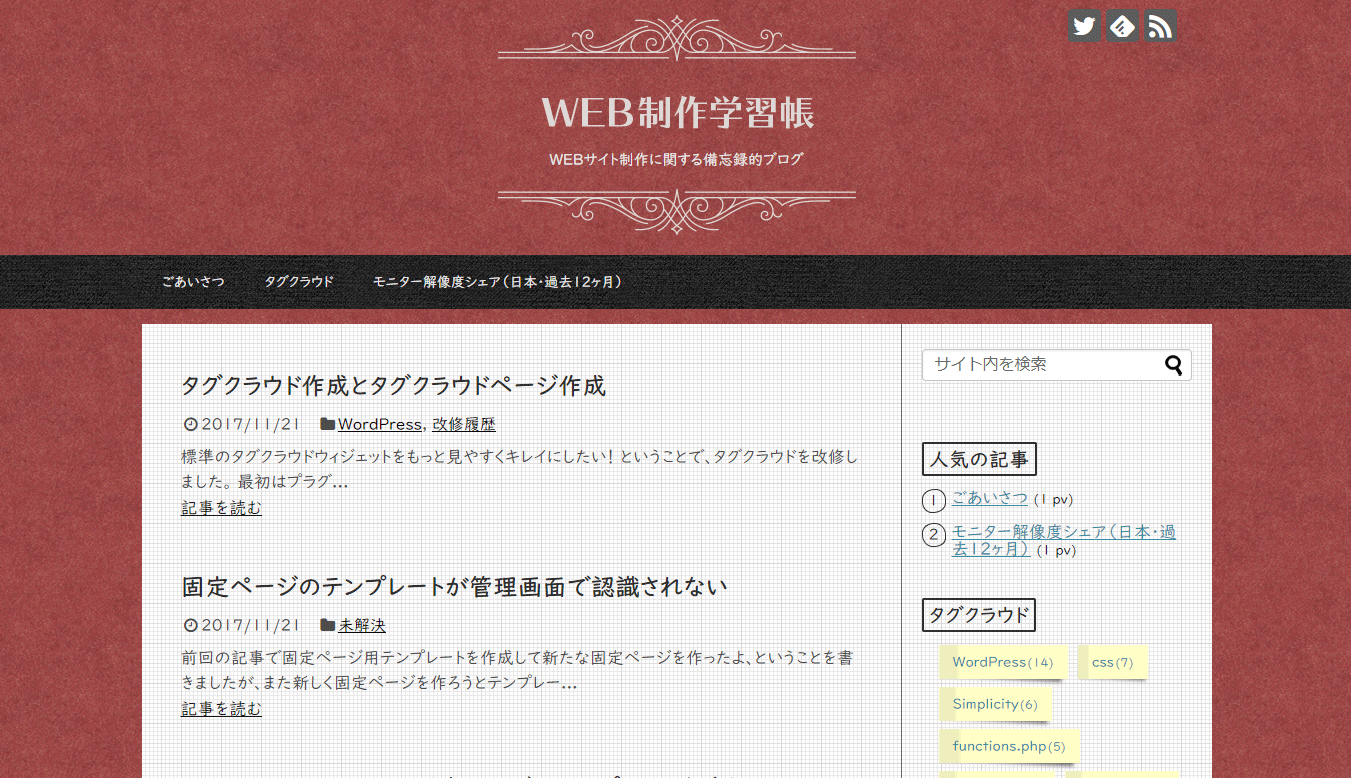
この記事執筆中に見てくださった方がいる!
嬉しいです。ありがとうございます(^^)
補足
私(管理者)がアクセスしても増えるので、ログインユーザーの場合はカウントしないよう sidebar.php を編集しました。
if ( !is_user_logged_in() ) {
// ログインしていない
	if( is_single() || is_page() ){
		// 記事ページまたは固定ページの場合、アクセス数の保存
		set_post_views( get_the_ID() );
	}
}